
How to File Family Law Court Forms in California
Learn how to file Domestic Violence Restraining Order (DVRO) and Divorce (Dissolution of Marriage or Domestic Partnership) Forms in California. This guide covers an introduction to filing, an overview of preparing your court documents for filing, and a step-by-step process of filing your completed court documents in the courthouse.
Note: If you are looking for guidance on how to electronically file your documents (E-Filing), visit your court's website for specific instructions.
1. What is Filing?
Filing means officially submitting your legal documents to the court so that your case can be processed. In California, a document is considered "filed" when the court clerk endorses (stamps) it with the date and time it was received. This establishes the legal start date of your request or response. (California Rules of Court, Rule 2.259(a)(1) and Code of Civil Procedure § 1010.6(b)(3))
E-Filing
Electronic filing (e-filing) is the process of submitting court documents online rather than in person. E-filing is available in many—but not all—California counties. When you e-file, your documents are transmitted to the court through an approved e-filing service provider (EFSP) and receive a digital court "file stamp." (Code of Civil Procedure § 1010.6, California Rules of Court, Rules 2.250–2.261)
Important Note for Restraining Order Filings
Self-represented parties are exempt from mandatory e-filing (Cal. Rules of Court, Rule 2.253(b)(2)). Some courts also limit which family law documents may be e-filed; check your court's rules. Always check your local court's website or contact the family law clerk's office to confirm whether e-filing is allowed for your DVRO case. See E-Filing: How It Works below.
2. Preparing Your Court Documents for Filing
Review each of your forms one more time.
Make sure everything is correct. Even if you are using UDIL software to complete your court documents, you must read and reread each court form and attachment generated with your answers to the interviews to ensure that they reflect everything you want to tell the court.
If there are certain sections of your court forms and documents that you do not understand, or if you would like to ask specific questions about your case, contact your local Family Law Facilitator or visit your local court self-help center.
Make corrections, if necessary. You can edit your forms digitally, or directly on the form itself. Note, any text on your forms must be typewritten or hand printed in black or blue-black ink.
Print, date, and sign your forms.
If everything looks correct, print your forms. Ensure you print one-sided (do not print on the front and back of each sheet of paper). Sign each form where your signature is required. Use black or blue-black ink only.
If a form asks for your signature "under penalty of perjury": This means that when you sign the form, you are affirming that what is on the form is true and correct to the best of your knowledge.
If a form has attachments: Write where requested the number of pages attached in the space provided.
If you do not have access to a personal printer or copy machine, here are a few options you may use to print your court documents:
- Local Courthouse: Visit your local courthouse and check if they have a law library or self-help center. Many courthouses provide public access to computers and printers, allowing you to print your court forms securely. Additionally, these facilities often have staff available who can assist you in preparing and making copies of your forms for filing.
- Public Libraries: Public libraries often offer computer workstations and printing services. Check with your local library to see if they provide access to computers and printers for public use. Ensure that you follow their privacy guidelines and take necessary precautions to protect your sensitive information.
- Community Centers: Some community centers or nonprofit organizations may offer computer and printing facilities for public use. Reach out to these centers in your area to inquire about their available resources and any associated costs.
- Print Shops and Copy Centers: Commercial print shops and copy centers are an option for printing court forms. Some examples of commercial print shops around California are FedEx Office, the UPS Store, Office Depot/OfficeMax, Staples, and local printing companies. However, exercise caution when using these services, as they are not specifically designed for handling sensitive legal documents. Before using a print shop or copy center, ensure that they can maintain the confidentiality and privacy of your information.
- Friends, Family, or Trusted Contacts: If you have friends, family members, or trusted contacts who have access to a printer, you can ask for their assistance in printing your court forms. Make sure to only share your documents with individuals you trust and consider taking precautions to protect your privacy.
Check Court Filing Requirements.
Any individual who files court forms and other documents with the court is required to comply with the rules governing filing. Before filing, the Court recommends that you review the California Rules of Court, specifically Rules 2.100-2.119 and visit the California Court website's Basics of Court forms page. Pay special attention to the section titled "Tips for Filling Out Judicial Council Forms." Note that per Rule 2.100(c), papers that are submitted or filed electronically must meet the requirements in Rule 2.256(b).
California Judicial Council forms filing requirements (Last Updated: October 2026):
| Requirement | Specification |
|---|---|
| Paper Type | White or unbleached paper – 8½ × 11 inches |
| Paper Printing | One-sided only — only one side of each page may be used |
| Font | 12 pt — Courier, Times New Roman, Arial or equivalent (Handwritten papers are OK – but write legibly) |
| Text Color | All forms must be typewritten or printed in black or blue-black ink |
| Line Spacing | One and one-half or double-spaced |
| Margins | At least 1 inch from the left edge and ½ inch from right edge |
| Page Numbers | Pages must be numbered consecutively on the bottom |
| Binding | Original and copies must be firmly bound (e.g. stapled) AND the Original must be 2-hole punched at the top |
For a rule-by-rule breakdown, and which documents these rules apply to, see Organizing Your Forms for Filing.
Make copies of your forms.
Make at least 2 copies of your completed and signed court forms. You'll need 3 sets in total:
- The original court documents with your signatures (in black or blue-black ink) and 2-hole punched at the top — the court keeps this
- For yourself: One set of copies of each original court form and document (including attachments)
- To be served: One set of copies of each original court form and document (including attachments)
The court will keep the original forms and return the 2 file-stamped copy sets to you.
Divorce judgment packets are different: give the clerk the original plus 2 copies, and keep 1 more copy for yourself. The court mails the filed copies back in envelopes you provide. See Envelopes and postage.
Check for Local Court Filing Requirements.
Some counties in California have local rules or additional forms that must be submitted when filing DVRO paperwork, like proposed order forms. Filing procedures can also vary by courthouse—some accept forms in person, while others may offer electronic filing. These may include cover sheets or other forms specific to that court. To avoid delays or rejection due to incomplete paperwork, it's a good idea to review your local court's filing requirements in advance.
Click here to review your county's local rules organized by county on the Judicial Branch of California's website page titled 'Local Rules.'
Tip: If your court website asks you to choose a case type or division, Divorces and DVROs are generally filed under the "family law" division.
Click here to view a list of general filing requirements and local forms used for DVRO proceedings that we've compiled for many California counties. Because forms and procedures may change, it's still important to confirm with the court where you'll be filing.
3. Organizing Your Forms for Filing
How to put your packet together: which formatting rules apply, how to order attachments, hole punching, envelopes for mailed filings, and how e-filing works.
First, know which formatting rules apply to what.
The California Rules of Court, rules 2.100 to 2.119, set formatting rules for papers filed on paper. But these format rules do not apply to Judicial Council forms or local court forms, except where another rule says so. (Cal. Rules of Court, Rule 2.119)
So pre-printed Judicial Council forms (like the DV-100 or FL-300) are already formatted. The rules below apply to typed attachments and declarations you create yourself, such as a declaration on pleading paper or an attached statement.
| Item | What the rule says | Rule |
|---|---|---|
| Paper | 8½ × 11 inches, white or unbleached, opaque, unglazed, at least 20-pound weight. Use one side of the page only. | Rules 2.102, 2.103 |
| Font size and style | Not smaller than 12 point. Courier, Times New Roman, Arial, or an equivalent font. | Rules 2.104, 2.105 |
| Font color | Black or blue-black. | Rule 2.106 |
| Margins | Left margin at least 1 inch. Right margin at least ½ inch. | Rule 2.107 |
| Line spacing and numbers | One-and-a-half or double-spaced. Lines numbered consecutively, starting at 1 on each page. | Rule 2.108 |
| Page numbers | At the bottom of each page, in Arabic numerals (1, 2, 3). May be left off the first page. | Rule 2.109 |
| Footer | The title of the paper at the bottom of each page, in at least 10-point font. | Rule 2.110 |
| First page | Your name and contact information starting at line 1, blank space for the clerk's stamp, the court's name starting on line 8, then the case title and case number. | Rule 2.111 |
| Pages and binding | Original pages only (no riders added to a page). Firmly bound together at the top. | Rule 2.113 |
| Exhibits | Exhibits may be fastened to pages of the required size. | Rule 2.114 |
| Changes to a page | Any addition, deletion, or handwritten insertion must be initialed by the clerk or judge when the paper is filed. | Rule 2.116 |
| Copies | Copies you serve must match the filed originals. | Rule 2.117 |
Writing by hand is OK. The clerk must not reject a paper just because it is handwritten or hand-printed, or because it uses ink other than black or blue-black. (Cal. Rules of Court, Rule 2.118(a))
Capitalizing names, courts, and addresses.
As a general practice, write full names, the court's name, and parts of addresses in capital letters, especially on captions and envelopes. Follow your form's printed style and your court's local rules.
Put attachments behind the form they belong to.
Think of your packet as lead documents with attachments. An attachment stays physically together with, and directly behind, the form that refers to it. Do not mix it in with other forms.
DVRO examples:
- If your request includes child custody, visitation, or related orders, attach the DV-105 (Request for Child Custody and Visitation Orders) and DV-108 (Request for Order: No Travel with Children) behind your DV-100 (Request for Domestic Violence Restraining Order).
- Attach the proposed order forms DV-140 (Child Custody and Visitation Order) and DV-145 (Order: No Travel With Children) behind the proposed DV-110 (Temporary Restraining Order) and behind the proposed DV-130 (Restraining Order After Hearing).
For any form: Follow the form's own instructions about what to attach, and check the box on the lead form that refers to the attachment. Number the attached pages if the form asks you to. Keep a complete copy set for yourself.
Sample DVRO packet order (with child custody and visitation requests and NO financial orders)
1. DV-100 Request for Domestic Violence Restraining Order
- DV-105 Request for Child Custody and Visitation Orders
- DV-108 Request for Order: No Travel with Children
- DV-109 Notice of Court Hearing
- CLETS-001 Confidential CLETS Information
- Any other attachment your DV-100 refers to
2. DV-110 Temporary Restraining Order (proposed)
- DV-140 Child Custody and Visitation Order
- DV-145 Order: No Travel With Children
3. DV-130 Restraining Order After Hearing (proposed)
- DV-140 Child Custody and Visitation Order
- DV-145 Order: No Travel With Children
4. Other forms your court requires
Follow your court's instructions for any other required or local forms, such as form LASC-FAM-020: the mandatory Family Law Case Cover Sheet and Certificate of Grounds for Assignment to District used in Los Angeles county superior courts.
Two-hole punch the top of each original form (Pro tip: do this after making copies of originals, or your copies will include the hole punch marks)
A two-hole punch is an office tool that punches two round holes along the top edge of the page. For papers filed on paper (not e-filed), the holes go at the top center of the page: two holes centered 2½ inches apart and ⅝ inch from the top of the paper. (Cal. Rules of Court, Rule 2.115)
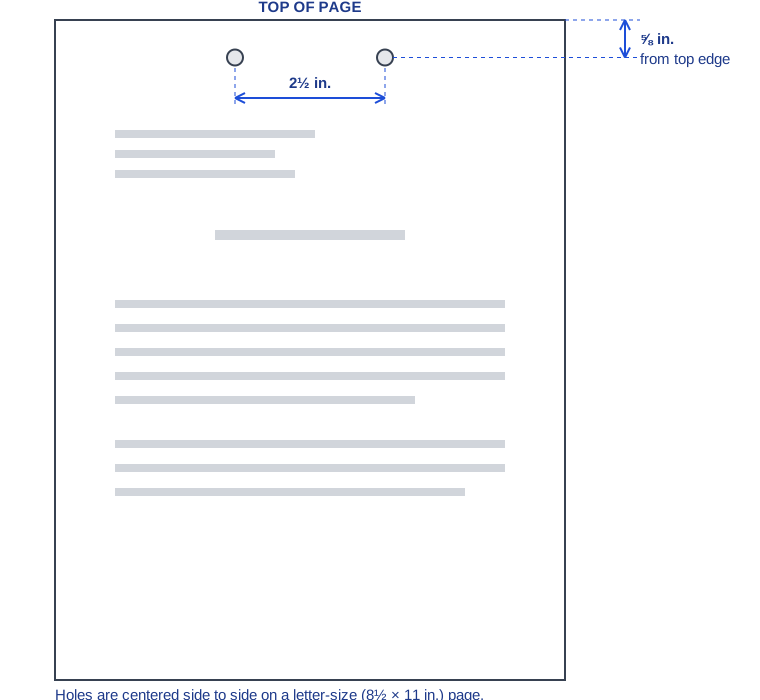
Some standard office punches space their holes a little differently. If you are not sure your punch will work, ask your court clerk before filing.
Envelopes and postage (judgments and mailed filings).
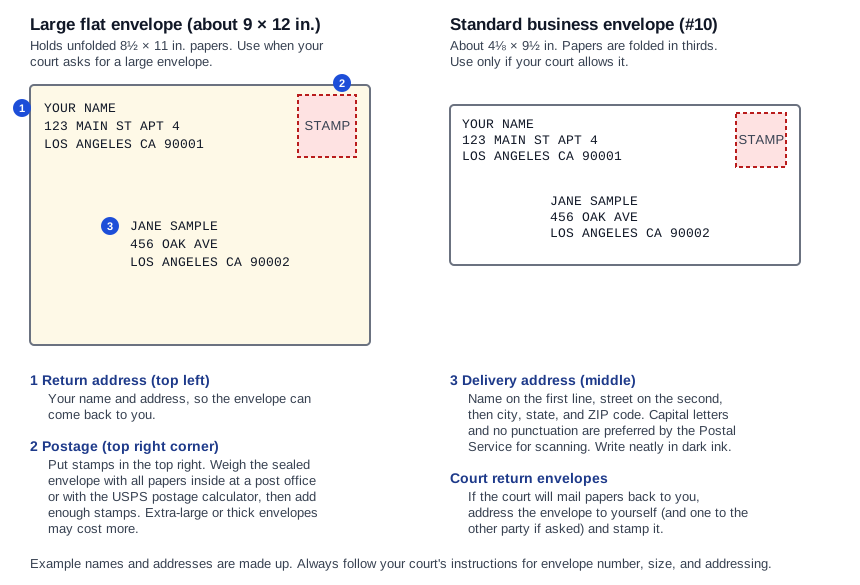
For some filings, the court mails file-stamped (conformed) copies back to you and the other party. To do this, the court asks you to provide pre-addressed, stamped envelopes. (Judicial Council of California, Self-Help Guide, “Submit your default judgment”)
Typical requests (these vary by court):
- Request to Enter Default (FL-165): the original plus 2 copies, and a stamped envelope addressed to the other party.
- Judgment packet: the original plus 2 copies to the clerk (keep 1 more copy for yourself), and 2 large envelopes big enough for the paperwork, one addressed to you and one to your spouse, with enough postage. The clerk uses these to mail back the filed Judgment and the Notice of Entry of Judgment (FL-190). Some courts also ask for a third, smaller envelope for the Notice of Entry of Judgment.
County practice varies. For example, as of October 2026, San Mateo County asks for 3 stamped, self-addressed envelopes, and Contra Costa County asks for one regular envelope and one large manila envelope. Always call your court or check its website for its exact envelope requirements.
Postage: Do not guess. Weigh the sealed envelope with everything inside, then use the USPS postage calculator or ask at a post office counter.
Addressing: Put the recipient's name, street address, and city, state, and ZIP code on separate lines.
E-Filing: how it works and how courts differ.
E-filing in California is governed by Code of Civil Procedure section 1010.6 and California Rules of Court, rules 2.250 and following. A document received electronically on a court day (12:00 a.m. to 11:59:59 p.m.) is treated as filed that day if the court accepts it. A document received on a non-court day is treated as filed on the next court day. (Code Civ. Proc. § 1010.6)
If you are representing yourself, e-filing is generally optional. Self-represented parties are exempt from mandatory e-filing and e-service. (Cal. Rules of Court, Rule 2.253(b)(2)) You may agree to receive documents electronically (e-service), but you must give express consent. E-filing a document does not, by itself, count as consent. (Code Civ. Proc. § 1010.6)
Fee waivers: The court must let you apply for a fee waiver as part of e-filing. If your fee waiver is granted, the court and the e-filing service provider must waive their fees. (Code Civ. Proc. § 1010.6)
In general, you create an account with an approved Electronic Filing Service Provider (EFSP), upload your documents as PDFs, choose your case and the document type, and pay any fees. The court clerk then accepts or rejects the filing. The court's own case system is separate from the EFSP you use.
There is no single statewide list of EFSPs. Each superior court publishes its own list, and which family law documents can be e-filed differs by court. For example, San Bernardino uses Odyssey eFileCA, and San Francisco directs filers to File & ServeXpress for its approved providers.
San Bernardino: Family law e-filing through approved EFSPs has been allowed since February 26, 2024. Documents must be text-searchable PDFs and cannot contain fillable fields (fillable Judicial Council forms must be flattened before you submit them). Size limits are 25 MB per document and 50 MB per filing. Stand-alone orders and judgments cannot be e-filed.
Ventura: The court's e-filing page states that e-filing is not yet available for family law cases.
These examples can change. Always check your own court's e-filing page.
- Find your court on the California Courts “Find My Court” page .
- Open your superior court's website and look for “E-Filing” or “Electronic Filing.”
- Check whether family law cases (and your specific document type) can be e-filed, and which EFSPs the court accepts.
- Read the court's file format and size requirements before you upload.
Only include the last four digits of Social Security numbers and financial account numbers in your filings. You, the filer, are responsible for removing (redacting) this information. (Cal. Rules of Court, Rule 1.201)
Before uploading, remove hidden information (metadata) from your PDF files. Family law filings have limited public access, but you still need to choose the correct case type and any confidentiality designation when you e-file.
4. Filing Your Completed Court Documents in the Courthouse
If your court allows e-filing and you choose to e-file, see E-Filing: How It Works above. Self-represented parties are not required to e-file (Cal. Rules of Court, rule 2.253(b)(2)). You can also check your court's website for its specific instructions.
Locating the Clerk's Office.
Once you arrive at the courthouse, the Clerk's Office is usually located on the ground floor. However, courthouses vary in design, so if it's not immediately evident, look for signs or directories that might guide you. The Clerk's Office is where most legal documents are filed and processed. Note that some courts may have multiple clerk offices that are dedicated to a particular area of law, e.g., Family Law, Probate, General Civil. If you're having trouble locating the Clerk's Office, don't hesitate to ask for help. Court security officers, often located at the entrance of the courthouse, can guide you.
At the Clerk's Office.
Once you've located the Clerk's Office, the process of filing may vary. Some offices use a ticketing system where you take a number and wait to be called to a window. Others may have you wait in line.
Interacting with the Clerk: When it's your turn, approach the counter and let the clerk know that you're there to file papers for a [your case type] proceeding. Be polite and patient — they handle a lot of cases and are there to help you. Have your papers ready to hand over, and make sure you have all the necessary copies as stated in your instructions.
Conformed/Endorsed (Stamped) Copies.
After the clerk reviews your forms, they will keep the original and return copies to you. They will "conform" or "endorse" these copies, by either physically stamping a copy, or by providing you a computerized court endorsement on the copy, showing your documents have been filed. Make sure you have these copies before leaving the office. If your court cannot provide these copies to you on the same day that you file, ask the clerk when these copies will be available for pickup.
Additional Information
The court is only typically open on weekdays between 8:30 AM and 4:30 PM (though your local Courthouse's hours may vary).
Note for those seeking restraining orders: If the court is closed and you need a restraining order immediately, take your court forms/documents to your local police station. They can help you apply for a restraining order right away.
California Family Code section 6222 states: "There is no filing fee for an application, a responsive pleading, or an order to show cause that seeks to obtain, modify, or enforce a protective order or other order authorized by this division when the request for the other order is necessary to obtain or give effect to a protective order. There is no fee for a subpoena filed in connection with that application, responsive pleading, or order to show cause. There is no fee for any filings related to a petition filed pursuant to Part 4 (commencing with 6300) of this division."
In other words, you are not required to pay any court filing fees in a Domestic Violence Restraining Order proceeding. This fee exemption applies whether you are the protected person requesting the order or the restrained person filing a response. California law waives all court fees associated with filing for, responding to, or renewing a DVRO.
If you cannot afford court filing fees in non-DVRO cases, you can apply for a fee waiver by completing and submitting the following forms:
- Form FW-001 (Request to Waive Court Fees)
- Form FW-003 (Order on Court Fee Waiver)
Fee waivers are available based on income eligibility. Contact your local court clerk for more information.
Note: By law, California courts should not charge filing fees to Petitioners or Respondents filing initial paperwork in Domestic Violence Restraining Order proceedings.
If you do not speak English well, you can ask the court clerk for an interpreter. The clerk may ask you to complete a request form if you want to have an interpreter at the hearing. If the court cannot give you an interpreter, bring an adult to interpret for you. Do not ask a witness in your case or a child involved in your case to interpret for you.
More post-filing information is available to UDIL members who have purchased packages through their member homepage.
Last Updated: October 2026
Print Page Summary
Want to print a summary of the information on this page? U Do It Legal provides some printable documents, free of charge. To download the filing information covered on this page, click the button below.
Representing yourself in a Domestic Violence Restraining Order (DVRO) case?
See UDIL's in person and online DVRO services below!
See DVRO Services